I am interupting the main story of this blog to review an exercise that happened at Astak yesterday. One person went out and purchased a Kindle 2 and pre-loaded books and music onto it. They also fully-charged it. It was then given to me and others in the office to try to figure out how to operate the Kindle 2 without reading the user manual. Astak does this so all of its employees find out the good and bad about their competion and to design better eBook Readers in the future. NOW... if only they would expand the exercise to include a one week trip to Hawaii to judge units in the sand. Ah, well, you cannot have everything.
I need to preface that I am male, 42 years old, with a 138 IQ. I am also working for Astak... a competitor to the Kindle 2. However, that means I know my way around eBook Readers and how they work and are used. It also means I am biased; but used to judging eBook Readers. I also compare based on our own EZ Reader device. It allows me to have a good knowledge of what the end users seem to want based on what they have expressed to me.
SO... onto the exercise.
First off, let me say I was a bit surprised that for this much money I got not somuch as a cheap vinyl pouch, nothing to listen to the music on, and nothing that I would want preloaded... if I bought a Kindle 2 the first step is downloading something I can read and listen to. I see this as a flaw with eBook Readers in general... many of these are GIFTS and people expect to at least be able to use the thing for its main purpose (reading a book) right out of the box. Amazon has a huge eBook library! Would it kill them to preload one classic book onto the device?? My EZ Reader comes with a minimum of 8 preloaded classic books for this purpose.
My analysis is my own and in no way expresses or implies the views of my companythruout this review.
I have to say that before turning the device on I could see the quality of workmanship. I give it a 9 (out 0f ten) for precise lines around the buttons and a great finish. I was impressed with the appearance and fit.
The Kindle 2 is LONG! I mean it is very long. That "qwerty" keyboard means a device that is heavy and unweildy to hold in the hand for long periods of time. It just seemed a bit too long for me. It is thin and that is a great improvement.
The Kindle 2 has a search function on it... but it is one of the least "logical" search engines I have seen. Looking for the pre-loaded music I typed in every word I could think up that had to do with music and came up empty. I was able to type in "book" and get the pre-loaded book to come up along with endless device info WHICH IS NOT A BOOK! I never did find ANY music on the device and I knew it was there.
Anyway, I did find a book and found the page advance. regress was great and smooth. The resolution was very good and reading was a breeze. I tried using the note-taking function (what appears to be the main use for the "qwerty" keyboard) and found it easy to use and essentially flawless once you scrolled up or down with the cursor to where you wanted the notewhich can be a chore. However, unless I am a student reading a textbook, I kind of wonder if I would ever use this type of note-taking. SO... high marks for the reading of the book but mediocre for the actual use of the note-taking.
What was really maddening was that once I was in the book I could not get out. There is no button for "return to main menu" or "stop application" or "end book". Frankly, I never did find the Main Menu at all and found that very strange. I am use to turning on an EZ Reader and having it greet me with a main menu that neatly lays out my main categories: "My Music" , My eBooks", "My Applications" and more. THIS, to me, is like "My Documents" on Windows on my PC. I organize THIS way!! Where is this on the Kindle 2? After trying everything I could think of I finally DID get out of the book but I have a suggestion for Amazon: MAKE IT SIMPLE!! Can you imagine a 65 or older person using a Kindle 2?? Yet, they adapt perfectly to the EZ Reader!
NOW, this exercise may prove useless to most people. That is what they have User Manuals for. BUT... if the goal of the eBook Reader is to be easy to understand (MEANING LOGICAL) this is the least LOGICAL device I have ever seen. I mean someone had to TRY to design something so inane as this interface. Whatever happened to "intuitive"?
Now, this is only an exercise and not a real review of the Kindle 2. You might love it if you are a PHD and a Rhodes Scholar. Me... after 90 minutes I wanted my sledge hammer. Amazon: buy an EZ Reader and do the same exercise. I will sell it to you at cost! Talk to HONDA and learn... "Make it SIMPLE".
Showing posts with label eBooks. Show all posts
Showing posts with label eBooks. Show all posts
Friday, March 27, 2009

Thursday, March 26, 2009
The start of my Adventures In EBook Reader Land
You think YOU have problems?? Try designing the best eBook Readers on the market only to find that few even know you are alive. This blog is going to talk about the decisions and difficulties in getting even the top eBook Readers to where they are selling well and the daily difficulties along the way.
I work for Astak, a company that makes and sells eBook Readers in North America. My points of view are my own and not necessarily those of Astak. Here we will discuss everything from technical issues to what it is like competing against the likes of Amazon and Sony. We will discuss the good and the bad and everything in between. You will likely learn a lot about the latest technologies used in eBook Readers, the latest features, and the trade offs that must be made.
Astak came into this with all the best intentions: build a great eBook Reader that is low priced and is solid and dependable. We were blessed with a factory in Taiwan that had been manufacturing Consumer Electronics all along but had zero idea of the North American market. That line was named "Mentor" and it was planned that we would release all three sizes: 5, 6, and 9.7 inch. Astak had tons of experience with Consumer Electronics and had sold already thru almost all of the major chain stores. It all seemed so simple at the start: the factory would build them and we would sell them. Boy, were we uninformed.
The first thing we learned was that eBook Readers need a format: the way that the device can reveal text or pictures. We had heard of Mobipocket and the factory was hot on using that format. We talked with Mobipocket and they seemed happy to license their format on our EZ Readers. That seemed a natural solution and we figured that was done. Amazon purchased Mobipocket and the rules suddenly changed.
In the meantime the first prototypes from our factory came and they were totally "un-Americanized"... not ready for the North American market in our opinion. There were little buttons everywhere and none of them were labeled and none made much sense. We thought we could design better. The probkem was the factory was selling already in Europe and Asia and was not too open to a redesign without huge quantities behind it. HOW do you place a huge order quantity with no solid business decision.
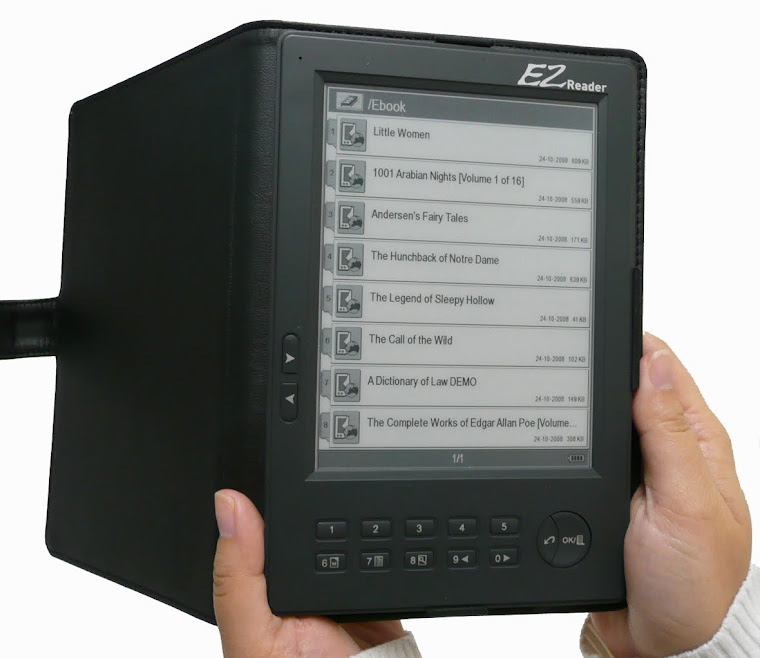
We looked at other eBook Readers around the world. Jinke in China made a great unit and it needed very few changes... just an American touch on service, warranty, support, and marketing. This was the birth of what became known as the EZ Reader Basic. It is a good and very honest rock-solid device that (without fanfare) excels in providing a great read because it used E-Ink and E-Paper technology giving 8,000 pages to a single charge. It was GREEN because of the power saving... and we saw it as a way to help keep the American public from supporting paper waste in our landfill and limiting toxic paper by-products in our streams and lakes. PLUS... people could carry around all of their old purchased eBooks and have it with them wherever it went.
Being less than 7 ounces, and the thickness of a pencil, it was easy to love and lug around. PLUS, all the things that the competition charged for or left out (crush-resistant leather case, ear buds, BOTH AC Adapter and USB cable, replaceable and rechargeable battery, wrist leash, and even a screw driver for the battery door) were right in the box.
I work for Astak, a company that makes and sells eBook Readers in North America. My points of view are my own and not necessarily those of Astak. Here we will discuss everything from technical issues to what it is like competing against the likes of Amazon and Sony. We will discuss the good and the bad and everything in between. You will likely learn a lot about the latest technologies used in eBook Readers, the latest features, and the trade offs that must be made.
Astak came into this with all the best intentions: build a great eBook Reader that is low priced and is solid and dependable. We were blessed with a factory in Taiwan that had been manufacturing Consumer Electronics all along but had zero idea of the North American market. That line was named "Mentor" and it was planned that we would release all three sizes: 5, 6, and 9.7 inch. Astak had tons of experience with Consumer Electronics and had sold already thru almost all of the major chain stores. It all seemed so simple at the start: the factory would build them and we would sell them. Boy, were we uninformed.
The first thing we learned was that eBook Readers need a format: the way that the device can reveal text or pictures. We had heard of Mobipocket and the factory was hot on using that format. We talked with Mobipocket and they seemed happy to license their format on our EZ Readers. That seemed a natural solution and we figured that was done. Amazon purchased Mobipocket and the rules suddenly changed.
In the meantime the first prototypes from our factory came and they were totally "un-Americanized"... not ready for the North American market in our opinion. There were little buttons everywhere and none of them were labeled and none made much sense. We thought we could design better. The probkem was the factory was selling already in Europe and Asia and was not too open to a redesign without huge quantities behind it. HOW do you place a huge order quantity with no solid business decision.
We looked at other eBook Readers around the world. Jinke in China made a great unit and it needed very few changes... just an American touch on service, warranty, support, and marketing. This was the birth of what became known as the EZ Reader Basic. It is a good and very honest rock-solid device that (without fanfare) excels in providing a great read because it used E-Ink and E-Paper technology giving 8,000 pages to a single charge. It was GREEN because of the power saving... and we saw it as a way to help keep the American public from supporting paper waste in our landfill and limiting toxic paper by-products in our streams and lakes. PLUS... people could carry around all of their old purchased eBooks and have it with them wherever it went.
Being less than 7 ounces, and the thickness of a pencil, it was easy to love and lug around. PLUS, all the things that the competition charged for or left out (crush-resistant leather case, ear buds, BOTH AC Adapter and USB cable, replaceable and rechargeable battery, wrist leash, and even a screw driver for the battery door) were right in the box.
Subscribe to:
Posts (Atom)